Showing posts with label Moxa. Show all posts

Monday, August 3, 2015

Seamless connections and compatibility between devices and PLCs


Using Industrial Ethernet Gateways for VFD  (variable frequency drive) applications adds flexibility to your system. Moxa's comprehensive industrial Ethernet gateway solutions, the MGate series, are designed with innovative and automated technology to ensure quick installation and easy management of your industrial fieldbus-to-Ethernet networks.

 To help you master fieldbus communications, Moxa also delivers industrial fieldbus gateways to transfer control data between different fieldbus protocols. The Mgate gateways are a better protocol conversion solution between PLCs and Devices.

Find a better protocol conversion

Tuesday, June 23, 2015

Security and Connectivity in Industrial Automation


If only we could throw a big security blanket over all operations and rest easy knowing that we can prevent attacks, mistakes, and malfunctions.
If only it could be that simple... but as we become more connected to devices, networks, and software our risk increases. In this month's e-newsletter, we focus on how we can gain protection through upgrading, remote access, managed switches and more.


 We would like to hear from you and how your organization minimizes security risk.
Best regards,

Jane Mohr   


When it comes to security, choose automation software you can trust
Wonderware 

What do you look for when you choose an automation software provider? If you are like most people, you have a long list of expectations. Perhaps at the top of that list, you expect automation software to keep your processes and data secure. Ultimately, Wonderware is the only automation software that has the longevity and stability to do just that. With a solid track record, over 25 years in the industry, Wonderware is dedicated to protecting your systems. Take a look at Wonderware System Platform. 
It is a highly secure development & deployment environment that can be configured to control system access and user rights, along with tracking system changes by user. It is also supports Microsoft Integrated Security, SmartCard & other security protocols and methods. Since applications are managed from a central location, you do not have to worry about security issues associated with multiple applications running at multiple sites; this significantly reduces the burden on your IT organization.
Wonderware is the automation software partner you can trust.
See why.


Secure remote access to HMIs, PLCs, and other industrial equipment
Secomea 
Industrial communications must be deployable, secure, and reliable. With Secomea remote access solutions, you can easily monitor, manage, and service equipment. The solution consists of a control unit at the factory (SiteManager) and a Web or Windows based client (LinkManager) for an engineer or end-user. These two components are tied together via a M2M communication server (GateManager) that is available as both a cloud based service and a stand-alone server. Whether it is programming, controls, logging, infrastructure or all of the above, this remote access solution is secure and hassle-free.

Gigabit cyber security solutions
Moxa

There are three key vulnerabilities of automation networks: 

1)Time-critical applications and data-hungry applications (such as video) have extremely low tolerance for latency. 
2)The unsecure Modbus TCP protocol is widely used in industrial automation. 
3)Non-industrial-grade cyber security devices can't withstand harsh industrial operating conditions, and will malfunction in those settings.

Moxa offers a router/switch solution to minimize these security risks. The EDR-810 is a highly integrated industrial multiport secure router with Firewall/NAT/VPN and managed Layer 2 switch functions. It is designed for Ethernet security applications in sensitive remote control or monitoring networks. 
                                                                     

Tuesday, January 20, 2015

Increasing Operational Agility with Industrial Automation

We have all heard the phrase "Work smarter, not harder" and have received tips like time management, bundling tasks, don't focus on the totality of a "to do list", etc... Truth is, hard work and smart work is not mutually exclusive and fortunately, with industrial automation, there are systems, tools, and products that enable operators the agility to spot opportunities for greater flexibility, speed, and workforce responsiveness.
      We focus on a few solutions that increase operational agility by:

  • Putting together systems to gather, share, and change processes quickly
  • A retrofit solution to save labor, energy, and cost while improving quality, accuracy, and precision
  • Managing data to spot opportunities and prompt troubleshooting
  • Resources for customization when standards don't work
Happy New Year,
Jane Mohr


Increasing responsiveness with real-time information 
Wonderware MES /Performance
Today's operations requires greater visibility, a reduction of product costs, and improvement of product quality. Wonderware MES offers solutions to help operators to recognize how their processes impact the business with key performance metrics. 72% of surveyed MES customers improved equipment uptime by 5-10% or more with MES Software.*
Manage both production and performance by:
  • Reducing lead times
  • Shortening Time to Market
  • Cost Cutting
  • Exceeding Customer Expectations
  • Streamlining processes
  • Managing the global operation

*Source: TechValidate. TVID:757-8B3-C2E

Retrofit helps operators modernize without the high cost 
ABB Drives and Controls

Operational agility often includes the ability to find solutions for simple and easy modernization. Being able to upgrade without having to go through a huge installation process can: 
  • Optimize the budget
  • Decreasing maintenance cost
  • Increase of productivity
  • Reduce production downtime
  • Extend the life of existing equipment
With the ABB DCS800 retrofitters can provide up-to-date technology at a fraction of the cost of replacing the entire system. With its special features, the DCS800 makes installation and configuration simple  by allowing you to customize the application to your needs.   

Quick troubleshooting to increase operational dexterity
Moxa
Last month we discussed how MXstudio suite delivers easy management, mass configuration, smart visualization, and quick trouble shooting in developing best practices in Network Management. Two software features in this management suite helps operational agility by providing data for quick troubleshooting. The MXview studio offers:  
  • Auto discovery of network devices and physical connections
  • Event playback
  • Color-coded VLAN/IGMP groups and other visualization network data
The N-Snap Industrial Network Snapshot tool:
  • Takes network snapshots
  • Compares network and device data, and highlights the differences

 Unprecedented Flexibility:

The new BL67 Ethernet Gateway 
Turck
  Turck's BL67 offers an easy-to-deploy industrial  Ethernet solution. Though it combines the multiprotocol technology (one device - for three Ethernet protocols), it only allows one Ethernet master to control outputs while input is still available to the other protocols.  The BL67 provides unprecedented flexibility -already concealed, you can add more I/O without having to purchase a new, larger enclosure. The BL67 is ideal for harsh environments where conditions may not be conducive to traditional I/O.
Learn More

Tuesday, December 16, 2014

Reducing deployment time and effort by managing your industrial network

Creating best practices in network lifecycle, requires the ability to optimize network efficiency and minimize total cost of ownership. Moxa's management software helps achieve this by providing an all-in-one tool to manage challenging installation, operation, maintenance, and diagnosis of your industrial network.  The MXstudio suite delivers an easier management experience by addressing theses challenges and provides three key benefits; easy configuration, smart visualization, and quick troubleshooting.
Learn more on how MXstudio network management suite reduces deployment time and effort.

Wednesday, February 26, 2014

Extending IP Networks over Copper Wires

To improve the efficiency of industrial automation systems, many operators are considering
the possibility of IP upgrades to provide centralized control/management and remote
monitoring. When migrating to a converged IP-based network, acquiring an Ethernet
communication framework will be necessary to provide higher bandwidths and longer
transmission distances, which can require the installation of new cables. However, installation
of new cables can incur substantial costs in planning, labor, and system downtime. Under
hard-to-wire circumstances, or when budgets are limited, existing legacy copper-wire networks
can be a cost-effective alternative to quickly deploy an Ethernet extension.
Read this article to learn how you can significantly improve network communication and the methods to ensure a stable, reliable, and efficient DSL Ethernet extender deployment.

Friday, January 3, 2014

Industrial Networking Security Best Practices

      Protecting network-enabled industrial control systems from both external and internal
threats is critical to preventing costly intellectual property theft and ensuring cybersecurity.
In this white paper, Moxa explores the following five important topics related to 
cybersecurity:
  • Protecting against external hackers who want to cause a disruption
  • Protecting against external hackers who want to steal information
  • Protecting against internal employees who accidentally cause a disruption
  • Protecting against internal hackers who want to cause a disruption
  • Protecting against internal employees who want to steal information

                              Industrial Networking Security Best Practices                              

Wednesday, August 28, 2013

Serial to Ethernet Adapter

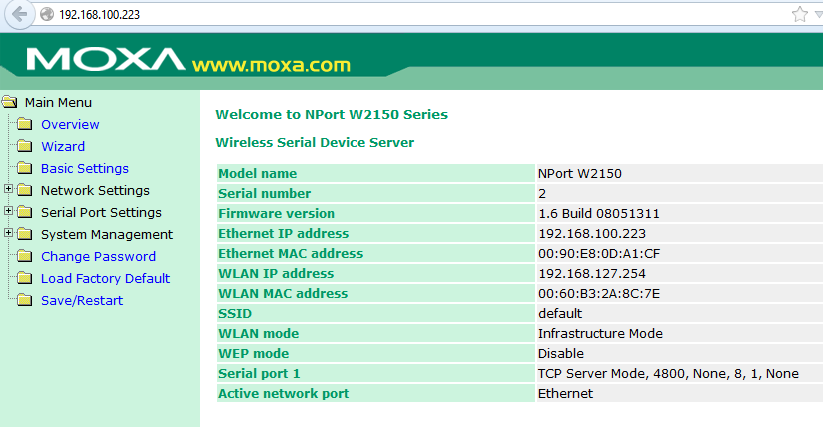
Many devices today still utilize serial ports for their primary interface. As Ethernet becomes more prevalent, it makes more sense to access legacy serial devices via this newer copper medium instead of expensive replacement. Moxa features many serial device servers which give Ethernet network connectivity to RS-232, 422, and 485 serial networks. Here's how to setup a Moxa NPort W2150.


Out of the box, this unit has a default IP address listed on the back. It features a built-in web server for configuring the IP address and serial port baud rate.

 
Lastly, download the Moxa NPort Com Port Driver. This driver dynamically finds each Moxa NPort and creates each respective com port on the PC.


Tuesday, January 22, 2013

Manage EIP Traffic with No Configuration!

Moxa now has a version of their managed switch that has IGMP snooping enabled out of the box. This means that you can install this switch and manage that pesky EIP traffic without ever logging on to the switch. As inventor Ron Popeil says, "Set it and forget it"!
Some Moxa switch models are available with a -EIP model number. The difference between an EIP and a non-EIP switch is a configuration setting. The EIP models are factory configured for IGMP snooping.

Non-EIP

EIP

Firmware in both switches is the same. Both will forward EIP traffic. Both can be accessed via an Allen Bradley ControlLogix add-on instruction. The part number difference is only to enable IGMP snooping by default. The non-EIP switch can be configured to be a -EIP switch by making the configuration change above. Note: one switch in the network must be enabled as the Querier.

Wednesday, August 29, 2012

I/O Mirroring with MOXA's ioLogik E1200 Series

Thanks to firmware updates, MOXA ioLogik E1200 series devices are now capable of peer-to-peer I/O mirroring. This brief how-to guide will show you how to set up a pair of E1200 units so that you can mirror digital or analog I/O signals from one to the other over an Ethernet network. 


Step 1: The ioLogik devices will need to be configured for the network they will be used on. This process will vary greatly depending on the type of network, so please refer to the product manual to complete this process. The manual can be found at www.moxa.com/support or at www.logic-control.com .


In our example, the input/sending device is an E1210 (set to 192.168.100.15), and the output/receiving unit will be an E1242 (192.168.100.16)


Step 2: Update the device firmware to the newest available version, which is available at www.moxa.com/support or at www.logic-control.com .


In the browser based configurator, select System Management > Firmware Update. Browse for the location on your computer where you have the firmware update save, then click update and follow the on screen instructions.


Step 3: Now we will configure the peer-to-peer communication between the two units. Use the menu on the left to navigate to Peer-to-Peer Settings > Rule 1-10.
In the configurator for the input E1210 device (192.168.100.15), we need to select the input channel we want to use to receive the initial signal (DI 00), the IP address of the output E1242 device (192.168.100.15)  the port we want to use (default, 9020) and how often the signal can be transmitted. In this example, we will disable the interval time and check On Change, so any change in the signal will be transmitted regardless of interval. For analog signals, On Change includes a percent value to determine how big a change needs to be in order to be transmitted.
Don't forget to check Enable!
 Step 4: Now we will configure the output device (E1242; 192.168.100.16).
In the configurator for the E1242, we navigate to the peer-to-peer settings like we did on the E1210. We select to output channel on the E1242 that we want to output the digital signal (DO 00). Then, we enter the IP address for the input 1210 device (192.168.100.15), the port number (9020), and the input channel we set up already on the E1210 (DI 00). It is very important that the remote channel and remote port values match between two units. Note that the interval time and on change values are greyed out. This is because the output unit will transmit the signal exactly as it is received, regardless of the interval established in the input unit.
The input signal to the E1210 should now be transmitted over the network and be mirrored on the output channel of the E1242. That's all there is to it.
For help with similar or more advanced applications, feel free to contact the Logic office as needed.
Written by Spencer Brown